Showing posts with label Collections. Show all posts

Thursday, December 27, 2012

Queue:


 यह भी एक प्रकार का डाटा structure है जो की Queue की तरह work करता है। इसमे First in First out (FIFO) के अनुसार काम करता है। इसमे सबसे पहले insert किया गया item सबसे पहले बाहर जाएगा और सबसे last मे input किया गया item last मे बाहर जाएगा।
Syntax: Dim <Queue Name> As New Queue 

Ex- Dim q as new queue 

  • Enqueue: इस method का use item को queue मे add करने के लिए किया जाता है। 

Syntax: Queue.Enqueue (object) 

Ex- q.Enqueue (“A”) 

  • Dequeue: इस method का use item को queue से delete करने के लिए किया जाता है। 

Syntax: Queue.Dequeue() 

Ex- q.Dequeue () 

  • Contains: इसका प्रयोग item को चेक करने के लिए किया जाता है। 

Syntax: Queue.Contains (object) 

Ex- q.Contains (“A”) 

Program: Queue:


Public Class Form1

    Dim q As New Queue

    Private Sub Refreshlabel()
        Dim i As Integer
        Dim ar() As Object
        ReDim ar(q.Count)

        ar = q.ToArray
        Label1.Text = ""
        For i = 0 To q.Count - 1
            Label1.Text = Label1.Text & ar(i) & Chr(13)
        Next
    End Sub
    Private Sub Button1_Click(ByVal sender As System.Object, ByVal e As System.EventArgs) Handles Button1.Click
        q.Enqueue(TextBox1.Text)
        TextBox1.Clear()
        TextBox1.Focus()
        Refreshlabel()
    End Sub

    Private Sub Button2_Click(ByVal sender As System.Object, ByVal e As System.EventArgs) Handles Button2.Click
        q.Dequeue()
        Refreshlabel()
    End Sub

    Private Sub Button3_Click(ByVal sender As System.Object, ByVal e As System.EventArgs) Handles Button3.Click
        Dim s As String
        s = InputBox("Enter value to check")
        If q.Contains(s) = True Then
            MsgBox("Found")
        Else
            MsgBox("not Found")
        End If
    End Sub
End Class


Tuesday, December 25, 2012

Stack: 


             Stack भी एक VB.Net collections का टाइप है जो की Data structure के Stack की तरह ही कार्य करता है। यह last in first out के अनुसार काम करता है। इसमे डाटा input के लिए Push और Out के लिए Pop operation का use किया जाता है।

Declaration:

Syntax: Dim <stack name> As New Stack 

Ex- Dim stk As new stack 

Important Methods:

  • · Push: इसका प्रयोग stack मे item को add करने के लिए किया जाता है। 

Syntax: Stack.Push (object) 

Ex- stk.push (“A”) 
  • Pop: इसका प्रयोग stack से item को remove करने के लिए किया जाता है। 

Syntax: Stack.pop 

Ex- stk.pop 

  • Contains: इस method का use object को check करने के लिए किया जाता है। 

Syntax: Stack.Contains (object) 

Ex- stk.Contains (“A”) 

PROGRAM: STACK

Public Class Form1

    Dim stk As New Stack

    Private Sub Refreshlabel()
        Dim i As Integer
        Dim ar() As Object
        ReDim ar(stk.Count)
        ar = stk.ToArray
        Label1.Text = ""
        For i = 0 To stk.Count - 1
            Label1.Text = Label1.Text & ar(i) & Chr(13)
        Next
    End Sub
    Private Sub Button1_Click(ByVal sender As System.Object, ByVal e As System.EventArgs) Handles Button1.Click
        stk.Push(TextBox1.Text)
        TextBox1.Clear()
        TextBox1.Focus()
        Refreshlabel()
    End Sub

    Private Sub Button2_Click(ByVal sender As System.Object, ByVal e As System.EventArgs) Handles Button2.Click
        stk.Pop()
        Refreshlabel()
    End Sub

    Private Sub Button3_Click(ByVal sender As System.Object, ByVal e As System.EventArgs) Handles Button3.Click
        Dim s As String
        s = InputBox("Enter value to check")
        If stk.Contains(s) = True Then
            MsgBox("Found")
        Else
            MsgBox("not Found")
        End If
    End Sub
End Class


Monday, December 24, 2012

HashTable:
hashtable का use paired type के data को store करने के लिए किया जाता है। यह collection भी arraylist की तरह ही होता है पर इसमे item को access करने के लिए key का use किया जाता है। इसमे सभी items की एक key होती है। value array मे store होने वाली value ही होती केवल इसमे सभी values के साथ एक key भी होती है। hashtable मे key और value दोनों object type के होते हैं।
Declaration of HashTable:
       Syntax: Dim <HashTable name> As New HashTable
       Ex- Dim htable As new HashTable
Important Functions used HashTable:
  • Add: इस function का use hashtable मे value को add करने के लिए किया जाता है। इसमे key – key value है और Value- add होने वाला item है।
Syntax: HashTable.Add (key, value)
Ex- htable.add (1, “A”)
htable.add (2, “B”)
htable.add (3, “C”)
  • ContainsKey(): इस function का use hashtable मे key को check करने के लिए किया जाता है।
Syntax: Hashtable.ContainsKey (Key)
Ex- htable.ContainsKey (1)
  • ContainsValue: इस फंकशन का use hashtable मे value को check करने के लिए किया जाता है।
Syntax: Hashtable.ContainsValue (Value)
Ex- htable.ContainsKey (“A”)
  • Remove: इसका use key और उसकी value को hashtable से delete करने के लिए किया जाता है।
Syntax: Hashtable.Remove(key)
Ex- htable.remove(2)
Program: HashTable:

Public Class Form1

    Dim htable As New Hashtable

    Private Sub RefreshLabel()
        Dim objkey As Object
        Dim objval As Object
        Label1.Text = ""
        For Each objkey In htable.Keys
            objval = htable.Item(objkey)
            Label1.Text = Label1.Text & "Key :  " & objkey.ToString & ",  Value:   " & objval.ToString & Chr(13)
        Next
    End Sub
    Private Sub Button1_Click(ByVal sender As System.Object, ByVal e As System.EventArgs) Handles Button1.Click
        Dim oval, okey As Object
        okey = InputBox("Enter Key")
        oval = InputBox("Enter Value")
        htable.Add(okey, oval)
        RefreshLabel()
    End Sub

    Private Sub Button2_Click(ByVal sender As System.Object, ByVal e As System.EventArgs) Handles Button2.Click
        Dim okey As Object
        okey = InputBox("Enter Key to check")
        If htable.ContainsKey(okey) = True Then
            MsgBox("Key found")
        Else
            MsgBox("Not Found")
        End If
    End Sub

    Private Sub Button3_Click(ByVal sender As System.Object, ByVal e As System.EventArgs) Handles Button3.Click
        Dim oval As Object
        oval = InputBox("Enter Key to check")
        If htable.ContainsValue(oval) = True Then
            MsgBox("Value found")
        Else
            MsgBox("Not Found")
        End If
    End Sub

    Private Sub Button4_Click(ByVal sender As System.Object, ByVal e As System.EventArgs) Handles Button4.Click
        Dim okey As Object
        okey = InputBox("Enter Key to remove")
        htable.Remove(okey)
        RefreshLabel()
    End Sub
End Class

Saturday, December 22, 2012

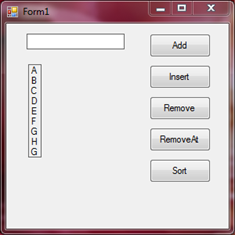
ArrayList:

      Arraylist collection vb.net मे available एक powerful data structure है। यह array की तरह ही multiple elements को maintain करने की सुविधा देता है। यह array मे data values को आसानी से add, delete, insert, view etc. के लिए methods provide करता हैं। इसमे किसी भी location मे data को insert किया जा सकता है, remove किया जा सकता है, find किया जा सकता है। यह एक dynamic data structure है जिसकी size automatically change हो जाती है। यह data को sort करने की भी सुविधा देता है। 

Creating an ArrayList: Arraylist को उसे करने से पहले इसका एक object declare करना पड़ता है। इसे declare करते समय new keyword का use किया जाता है और इसकी size को नहीं define किया जाता है। जैसे 

Dim alist As new ArrayList 

Functions in ArrayList: 

· Add: इस method का प्रयोग Arraylist मे item को Add करने के लिए किया जाता है। 

Syntax: ArrayList.Add (item) 

    Item: arraylist मे add किया जाने वाला item. 

                                                              Exp: alist.Add( “one”) 

alist.Add (“two”) 

alist.Add (“four”) 

· Insert: इस method को arraylist मे item को specific postion मे insert करने के लिए किया जाता है। इसमे item की index की भी आवश्यकता पड़ती है जहां item को insert करना है। 

Syntax: ArrayList.Insert (index, item) 

Index: arraylist मे item की position 

Item: arraylist मे add की जाने वाला item. 

Exp: alist.Insert (2, “three”) 

· Remove: इस method का प्रयोग किसी item को arraylist से remove करने के लिए किया जाता है। 

Syntax: ArrayList.Remove (item) 

Ex: alist.remove (“one”) 

· RemoveAt: इस method का प्रयोग की item को उसकी index के द्वारा remove करने के लिए किया जाता है। 

Syntax: Arraylist.removeat (index) 

Ex- alist.Removeat (2) 

· Sort: इस method का प्रयोग arraylist मे उपलब्ध items को sort करने के लिए किया जाता है। 

Syntax: ArrayList.Sort ( ) 

Ex- alist.sort ( ) 

· Item: इसका प्रयोग arraylist मे store की गई values को access करने के लिए किया जाता है। items के access करने के लिए index का use किया जाता है। 

Syntax: ArrayList.item(index) 

Ex- alist.item(0) 

· Count: इस property का use arraylist मे available items को count करने के लिए किया जाता है। यह integer type की value return करती है।


Public Class Form1

    Dim alist As New ArrayList

    Private Sub RefreshLabel()
        Dim i As Integer
        Label1.Text = ""
        For i = 0 To alist.Count - 1
            Label1.Text = Label1.Text & alist(i) & Chr(13)
        Next
    End Sub

    Private Sub Button1_Click(ByVal sender As System.Object, ByVal e As System.EventArgs) Handles Button1.Click
        alist.Add(TextBox1.Text)
        RefreshLabel()
        TextBox1.Clear()
        TextBox1.Focus()
    End Sub

    Private Sub Button2_Click(ByVal sender As System.Object, ByVal e As System.EventArgs) Handles Button2.Click
        Dim i As Integer, item As String
        i = Val(InputBox("Enter Index to Insert item"))
        item = InputBox("Enter the Value")
        alist.Insert(i, item)
        RefreshLabel()
    End Sub

    Private Sub Button3_Click(ByVal sender As System.Object, ByVal e As System.EventArgs) Handles Button3.Click
        Dim item As String
        item = InputBox("Enter item to Remove")
        alist.Remove(item)
        RefreshLabel()
    End Sub

    Private Sub Button4_Click(ByVal sender As System.Object, ByVal e As System.EventArgs) Handles Button4.Click
        Dim i As Integer
        i = Val(InputBox("Enter index to remove"))
        alist.RemoveAt(i)
        RefreshLabel()
    End Sub

    Private Sub Button5_Click(ByVal sender As System.Object, ByVal e As System.EventArgs) Handles Button5.Click
        alist.Sort()
        RefreshLabel()
    End Sub
End Class

Collections: 


        Visual Basic.Net collections ऐसे data structures हैं जो की different ways से Data को store कर different type के operations provide करते हैं। यह कई प्रकार के operations provide करते हैं जो की Array मे available नहीं होती हैं। VB.Net मे मुख्यतः चार प्रकार के collections provide करता है।

1. ArrayList

2. HashTable

3. Stack

4. Queue

Contact us

Name

Email *

Message *